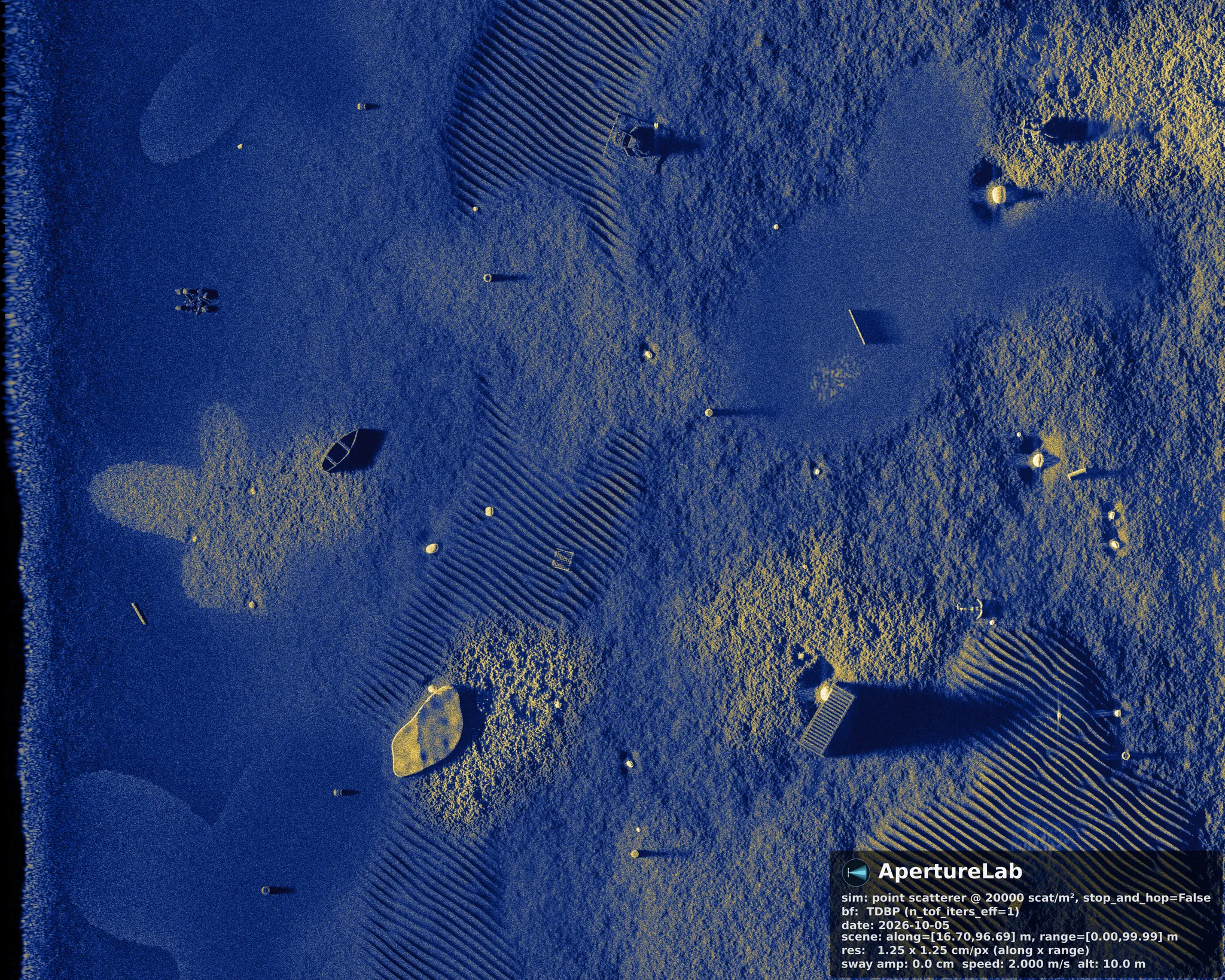
The ApertureLab MCP Server is a desktop program that connects a large language model to ApertureLab. Through it, Claude, GPT or a model running locally can design a sonar scene, run the simulator and beamformer on the workstation's own GPU, and read back the finished image. It uses the Model Context Protocol, so any client that supports the protocol connects to it without additional code.
The protocol
The Model Context Protocol (MCP) is an open standard, introduced by Anthropic in November 2024, for connecting language-model applications to external tools and data. A server publishes a list of tools, each with a name, a description and the arguments it takes. A client, such as Claude Code or Codex, reads that list, passes it to the model, and carries out the calls the model decides to make.
The choice of model is left to the user. The model behind the client can be one hosted by its provider, such as Claude or GPT, or one that runs entirely on the workstation.
Architecture
The MCP Server listens only on the loopback address, 127.0.0.1, on port 8737, so nothing outside the workstation can reach it. The client sends each tool call over Streamable HTTP; the server applies it to one shared scene session, runs heavy work such as terrain previews off its event loop, and queues simulations for the local GPU one at a time. Every result that names a file gives its path in the session folder, so the scene file and the images remain ordinary files that can be opened, versioned or re-run without the model.
The model never touches the GPU or the file system directly. It sees tool descriptions and tool results, and the server decides what each call is permitted to do, including fixed limits on scene size and scatterer density that hold whatever the model requests.
Throughput
Authoring a scene by hand means writing a YAML file against the full scene schema: seafloor zones, relief operators, objects and their burial, the imaging geometry and the run settings. A language model connected to the server does that designing and writing. It looks up the schema and the reference documentation through the server's describe tools, and it is instructed to validate every scene and preview the terrain before it asks for GPU time.
Before any simulation starts, the server checks the scene with the same validator the desktop application uses. The validator rejects a scene with invalid or contradictory settings, and it estimates the memory the run will need and compares that with the RAM free on the workstation. A scene that would fail is therefore caught in seconds, and the model is told why, instead of the failure appearing after minutes of simulation.
The person's part is to describe the scene and check the preview. A request for a rippled sand plain with a boulder field at mid-range and a pipeline crossing the swath, for example, is turned by the model into a complete scene file that the validator has accepted before anything runs, and the person never edits the YAML.
Automation
Because the server is reached through a protocol rather than a chat window, a session can run unattended. Claude Code and Codex both run headless from a script, so a batch job can ask the model for a family of scenes, such as one seafloor imaged at ten grazing geometries or with an object's burial stepped from exposed to fully covered, and let it create, validate and run each one in turn.
The loop also closes on the output. The look_at_result
tool returns the finished sonar image to the model, which can then
check whether the object it placed is visible, whether its shadow
falls where the geometry predicts, and whether the terrain reads as
intended, and revise the scene before the next run. Each run leaves its
scene file and images in the session folder, so the batch can be
reproduced afterwards without the model.
Integration
An MCP client can connect to several servers at once, and the model can call tools from all of them in one conversation. A group that already runs environmental models, such as a wave model, a sediment grain-size map or a bathymetry database, can expose them through their own MCP server or as files. The model then composes scenes from their outputs: the seabed type from the sediment map, the ripple wavelength and orientation from the wave conditions and grain size, and the relief from the bathymetry. The ApertureLab tools accept zone grids and meshes by file path, so gridded products and 3D models from other tools enter a scene directly.
This places the simulator inside a larger modeling chain. When the environmental model updates its forecast or moves to a new survey area, the language model regenerates the matching sonar scenes, and the simulated imagery follows the environment it is meant to represent.
The application
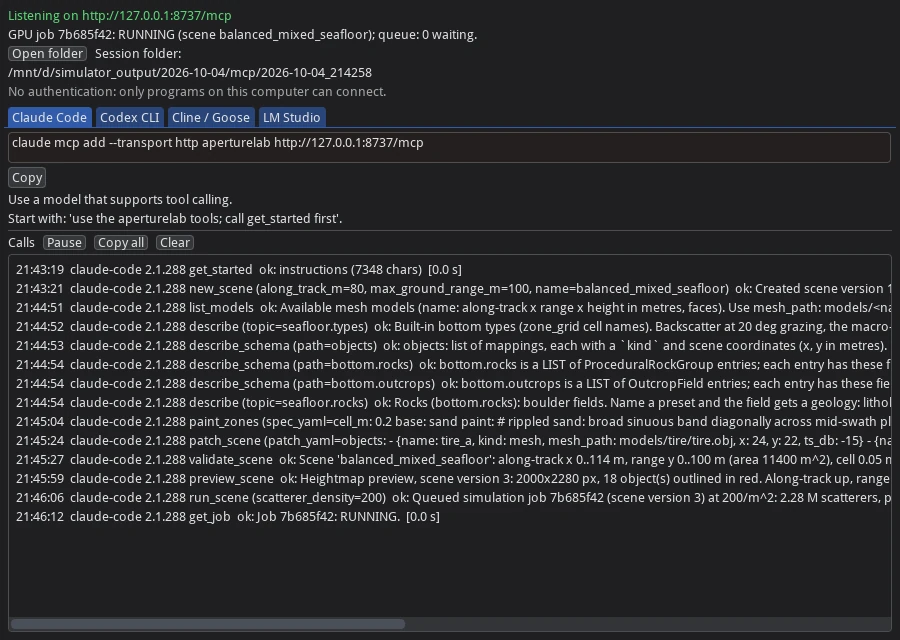
The server is its own entry in the ApertureLab folder of the Start menu. Its window shows the address clients connect to, the state of the GPU queue, the session folder, connection settings for each supported client ready to copy, and one log line for every tool call with its client, arguments, outcome and duration. Closing the window stops the server and any simulation it has running.
Setup
With the MCP Server running, each client needs one entry that points at its address. The window shows the same settings with the port it is actually using.
claude mcp add --transport http aperturelab http://127.0.0.1:8737/mcp~/.codex/config.toml:
[mcp_servers.aperturelab]
url = "http://127.0.0.1:8737/mcp"mcp.json (version 0.3.17 or later):
{ "mcpServers": { "aperturelab": { "url": "http://127.0.0.1:8737/mcp" } } }http://127.0.0.1:8737/mcp. Either agent can use a model
from OpenRouter, which gives access to Grok and other hosted
models.Limits
The MCP Server is distributed with the ApertureLab Windows installer and simulates on the workstation's NVIDIA GPU.
The server is meant to be used by a language-model client, such as Claude Code or Codex, running on the same workstation. It listens only on the loopback address and has no authentication of its own, so anyone logged in to that machine can reach it.
Web chat applications such as claude.ai and ChatGPT cannot reach a server on the loopback address, and Claude Desktop is not supported. The supported clients are Claude Code, Codex CLI, Cline, Goose and LM Studio.
The Blender scene import tools are not available through the MCP Server; a Blender scene is imported from the desktop application's File menu instead.
A local model must support tool calling and have a context window large enough for the server's instructions, which are about 7,000 characters, together with the descriptions of its 24 tools.